%201.webp)
02
AI Snaps
.svg)
.svg)
01
Our Work
03
About Us
04
Brand Audit
05
Contact Us
06
Client Success
12
07
Blogs
08
Careers
Book A Call
.svg)



.svg)
Need Help In Building Your Brand?
Click the button below & book a call with our founder directly.

Rishabh Jain
Managing Director
NPI-ready catalogue assets require: data template field by field, 3 mandatory image types, physical packaging compliance checks, and platform-specific specification.
This Confetti guide takes you through the step by step process for NPI (New Product Introduction) to get approval on Quick commerce platforms including Blinkit, Zepto and Swiggy Instamart.
NPI approval is a SKU-level process that happens after your master account is approved.
Each individual product you want to list must pass a separate review by the platform's category team. This review takes 1-3 weeks per batch. If you submit ten products with errors, you wait ten products' worth of correction rounds.
Once commercial terms are settled, the category manager (CM) hands you a product data template. This is usually an Excel sheet with a fixed set of required fields and you fill it in, attach your images, and submit.
This is how the platforms differ in how this works:
🛒Blinkit runs the most structured version of NPI. It's managed through the Seller Hub with CM coordination, and the data template, image specifications.
And shelf-life documentation requirements are clearly laid out upfront.
🛒Zepto has no public self-serve NPI portal. Every submission is initiated, reviewed, and approved by your category team directly.
This makes it the most challenging of the three from a brand's side. You get a pass or a rejection, and the specificity of the feedback varies by reviewer.
🛒Swiggy Instamart follows a similar category-manager-led flow, with data uploaded through the partner portal after KYC verification and commercial sign-off.
Instamart adds a step: physical verification at dark store inwarding. Your actual packaging gets checked against what you submitted digitally. So a mismatch between your NPI images and your real pack becomes a rejection at the warehouse.
The Cost of NPI Rejection Rounds
The CM reviews each SKU individually. A rejected field goes back into a review queue, behind a CM who's handling several other brand relationships at the same time.
🕑A round-trip correction on one field usually takes 5-7 working days.
Brands entering Q-commerce with multiple SKUs and multiple field errors can add 3-6 weeks to their timeline through entirely preventable catalogue mistakes.
If you are entering Q-commerce ahead of Diwali, IPL season, or a product launch with a marketing campaign behind it and your NPI stalls, you miss the window your entire launch plan was built around.
A 3-week delay will result in missing the revenue growth.
Your CM hands you this template once commercial terms are locked in. Every column is a validation check, and a single wrong entry in the wrong field can stall an entire SKU.
The product name field is a search-parsed catalogue field that directly determines how your product appears in platform search results and what consumer queries it matches.
The correct structure, consistent across Blinkit, Zepto, and Instamart:
✅Brand Name | Product Name | Key Variant or Claim | Pack Size/Weight
Examples:
❌What Most Brands Get Wrong:
They write marketing copy in the product name field, "Our Delicious Artisanal Dark Chocolate Protein Bar with Real Almonds and Zero Refined Sugar (50g)", which doesn't parse in platform search.
A customer searching "protein bar dark chocolate" on Zepto sees a keyword-matched title before they see marketing language. Your title structure should match how your target customer searches.
Why Variant Clarity Matters:
If your brand makes 5 flavours and the variant is not clearly stated in the title field, the platform can't differentiate your SKUs in search results.
"Yoga Bar Protein Bar 50g" and "Yoga Bar Protein Bar 50g" are indistinguishable listings. The variant callout in the title separates each SKU in the catalogue and in the consumer's search results.
Your HSN (Harmonised System of Nomenclature) code is a GST classification, and it has to match on 3 fronts:
If any one of these is out of sync, the SKU gets flagged at the data validation stage, frequently without a message that tells you which of the three caused it.
📌Before you fill the template, get your HSN codes verified by your CA against your actual GST certificate.
The MRP you enter in the template has to match the MRP printed on your physical packaging, to the rupee.
Instamart's inwarding team compares the MRP on the consumer unit against what's declared in the system. A gap of even ₹2 puts the consignment on compliance hold, and it gets returned.
🔵Before you submit: check that the MRP on your most recent production batch matches the commercial terms you've agreed with the platform.
If your pricing has shifted since your last print run, resolve that mismatch before you dispatch inventory.
📌There's also a parity expectation across the board. All three platforms expect the same MRP on Blinkit, Zepto, Instamart, Amazon, and in offline retail.
If you undercut your price on another sales channel, CMs may flag it as a pricing integrity issue during the review process.
This field records the actual net weight or volume of the consumer unit being listed. It feeds:
Your Q-commerce pack size may not be the same as your retail or e-commerce pack size.
📌A 5kg atta pack that sells in a supermarket does not convert as an impulse or replenishment purchase on Zepto. A 1kg or 2kg pack does.
The NPI data template is where you formally declare which SKU variant is being listed. That means NPI preparation is also a pack-size decision point.
Your GS1-registered EAN-13 or UPC-A barcode is entered into the product data template and printed on the product, serving both as catalog data and the scannable identifier used during fulfillment.
🔵On the data side: the code in your NPI submission has to be the exact 13-digit number printed on the physical product. Any mismatch causes rejection at inward, even if the data field itself was filled correctly.
🔵On the physical side: the barcode's position is important . If it's printed on the base of a box that is flat on a shelf, or on a panel facing away from where a picker's scanner reaches, it can't be scanned without pulling the product off the shelf first.
This slows down every single pick and creates fulfillment errors that have nothing to do with your data.
📌All 3 platforms require GS1-registered EAN codes specifically. Barcodes you've generated internally, QR codes, and PDF417 codes don't qualify.
For food and personal care SKUs, you're required to declare total shelf life, the full duration from date of manufacture. This is what the platform uses to calculate the minimum remaining shelf life it will accept at inwarding.
🔵The thresholds across platforms:
🚫The mistake brands make most often is declaring an expiry date instead of a duration.
The platform needs to know the total shelf life in days from manufacture.
If your product has a 180-day shelf life and a batch arrives with 100 days left, that's 56% remaining. It actually falls short of 60% and it also misses Blinkit's 90-day minimum in the exact scenario that looks fine on paper.
Plan your production and dispatch timing against these thresholds.
Every SKU needs a category and sub-category assignment in the platform's taxonomy. This decides which browse pages your product shows up on, separate from what it matches in search.
A protein bar mapped only to "protein" is invisible on the "healthy snacks," "gym food," and "high protein" browse paths that generate real organic traffic on both Blinkit and Zepto.
Browse-driven discovery, accounts for a meaningful share of Q-commerce impressions, especially for categories customers don't search by exact name.
📌Before you submit, spend 20 minutes browsing the relevant category pages on the platform you're onboarding to. Note every sub-category where a comparable competitor product shows up, and map your SKU to each one the platform allows.
It's about accurately placing a product in every consumer context it genuinely belongs to.
Every platform asks for a minimum of 3 images per SKU before it will approve an NPI submission.
Each image does a distinct job: one proves what the product is, one proves it's legally compliant, one persuades someone to buy it.
📸Consistent Baseline Specs:
📸Difference Across Platforms :
This is the image shoppers see as a small thumbnail alongside 15–20 competing products. It has just a few seconds to capture attention and earn a click before they scroll past.
The brands that win at that scale share a pattern:
👉Brand name legible at 200x200px
👉Variant instantly distinguishable from siblings in the same range
👉A dominant colour with enough contrast to stand out against a wall of white-background thumbnails
👉A label hierarchy simple enough that nothing competes with the brand name for the eye's attention.
Take the 3-Second Scan Test: place your primary image at 200x200px on an actual phone screen next to five competitor images in the same category.
Ask three questions.
❓Does the brand name read first
❓Is the variant immediately clear
❓Does it stand out against the images next to it?
If any answer is no, the image needs work before it goes anywhere near NPI.
📌At Confetti, every packaging brief we run for a quick commerce launch includes a mandatory thumbnail test as a checkpoint.
If the brand name isn't immediately readable, if the variant isn't distinguishable, or if the image just doesn't hold its own in the scroll, the design goes back because the consumer won't click without it.
📸This image shows the back of your packaging:
A Q-commerce shopper can't pick the product up and turn it over before buying. This image is the only substitute for that.
For categories where the purchase decision hinges on ingredients: clean beauty, supplements, baby food, anything allergen-sensitive, this image has a direct effect on whether the add-to-cart happens at all.
What the platform's review team actually checks against this image:
If your FSSAI number appears in your document submission but isn't clearly printed and visible on the back panel in this image, the submission gets flagged. The two have to match, visibly.
If the back panel doesn't fit cleanly in one frame, tilt the pack until it does. Don't submit a crop that cuts off part of the information.
📌One error shows up often with food brands specifically: submitting the outer carton's information panel instead of the individual consumer unit's panel.
If what you're actually selling on the platform is the single unit, the image has to show that unit's own labelling.
This is the image that shows the product being used: in a meal, mid-workout, as part of a routine, wherever its real-world context lives.
📸The first 2 images tell the shopper what the product is and confirm it's compliant. This one answers a different question: why buy it right now.
Q-commerce runs on impulse purchase more than almost any other retail channel. A lifestyle image that taps into the right appetite or desire cue is often the actual difference between an add-to-cart and a scroll-past.
📸Differences by Platform:
All three platforms follow up with a physical inspection, either during NPI review or at dark store inwarding.
They check whether the actual product matches your submission and whether every mandatory label element is visible on the consumer unit.
If you're a food brand, your 14-digit FSSAI licence number has to appear on the physical consumer unit.
Instamart's NPI team checks this directly against your submitted back-of-pack image.
🟦For the placement, the number needs to:
📌Test your physical label against these 3 points before you submit.
Every product on a Q-commerce platform needs the following on the primary consumer unit:
The barcode has to be physically scannable in the orientation your product actually is on a dark store shelf.
✅Correct placement: a vertical panel that faces outward in the product's default shelf-stacked position. For a box that is flat, that's the front, back, or side face a picker sees. For a pouch that stands upright, that's the front panel.
⛔Common mistakes: the base of a flat-sitting box (inaccessible without lifting the product), the top panel (blocked once anything's stacked above it), a narrow edge panel (too thin to scan reliably), or a panel that ends up facing the back of the shelf in default stacking.
📌A barcode in the wrong spot creates pick errors on the ground. Pickers can't scan it, fall back to manual overrides, and fulfillment slows down. Enough pick errors on a single SKU, and the platform starts deprioritising it from high-velocity dark stores.
Preparing one set of assets for Blinkit, Zepto, and Instamart is the right approach only if that single set meets the strictest requirement across all three platforms.
If you submit identical assets built to a single platform's spec, you'll get rejected on at least one of the other two.
Here's exactly where the platforms diverge:
📌Blinkit runs new brands through a Trial → Level progression.
The quality of your NPI assets directly influences where you start in that progression. Strong assets at this stage read as brand preparedness to your CM and that impression carries forward.
📌Operationally, Zepto runs a Vendor/Purchase Order model for most brands. You don't control your own inventory placement. Zepto's ops team handles dark store allocation after NPI, and your submission quality shapes how broadly they place your SKUs to start.
📌This is the strictest of the three platforms on execution detail.
Because Instamart runs on a B2B supplier model, your NPI submission also has to support automated weekly PO generation without exceptions.
Category managers are explicitly evaluating whether your product data, pricing, and packaging will let that process run seamlessly.
The exact assets you submit at NPI are the same assets shown to every consumer. How those assets perform in the first 7–30 days sets your organic ranking trajectory for the next 3-6 months.
Both Blinkit and Zepto use click-through rate (CTR) as one of their primary relevance signals.
A product that earns more clicks from the same search position reads to the algorithm as a stronger match for that query, and gets surfaced more prominently the next time someone searches it.
CTR on a Q-commerce category page comes down almost entirely to your primary image, specifically. From there, the mechanics compound. Higher CTR generates more orders. More orders build sales velocity.
📌The full chain: catalogue image quality → CTR → velocity → algorithm → organic ranking → sustainable visibility.
Products that miss internal velocity targets in the first 7-day window, get deprioritised in search and category rankings. That demotion doesn't reset once the window closes.
It persists, and reversing it costs additional ad spend well beyond what it would have taken to launch correctly.
This is why your NPI asset quality isn't just a go-live checkbox. It's a long-term ranking decision made before you've sold a single unit.
📌If you launch with assets that earn poor CTR, you've created a velocity deficit in Zepto's algorithm that takes weeks and budget to climb out of.
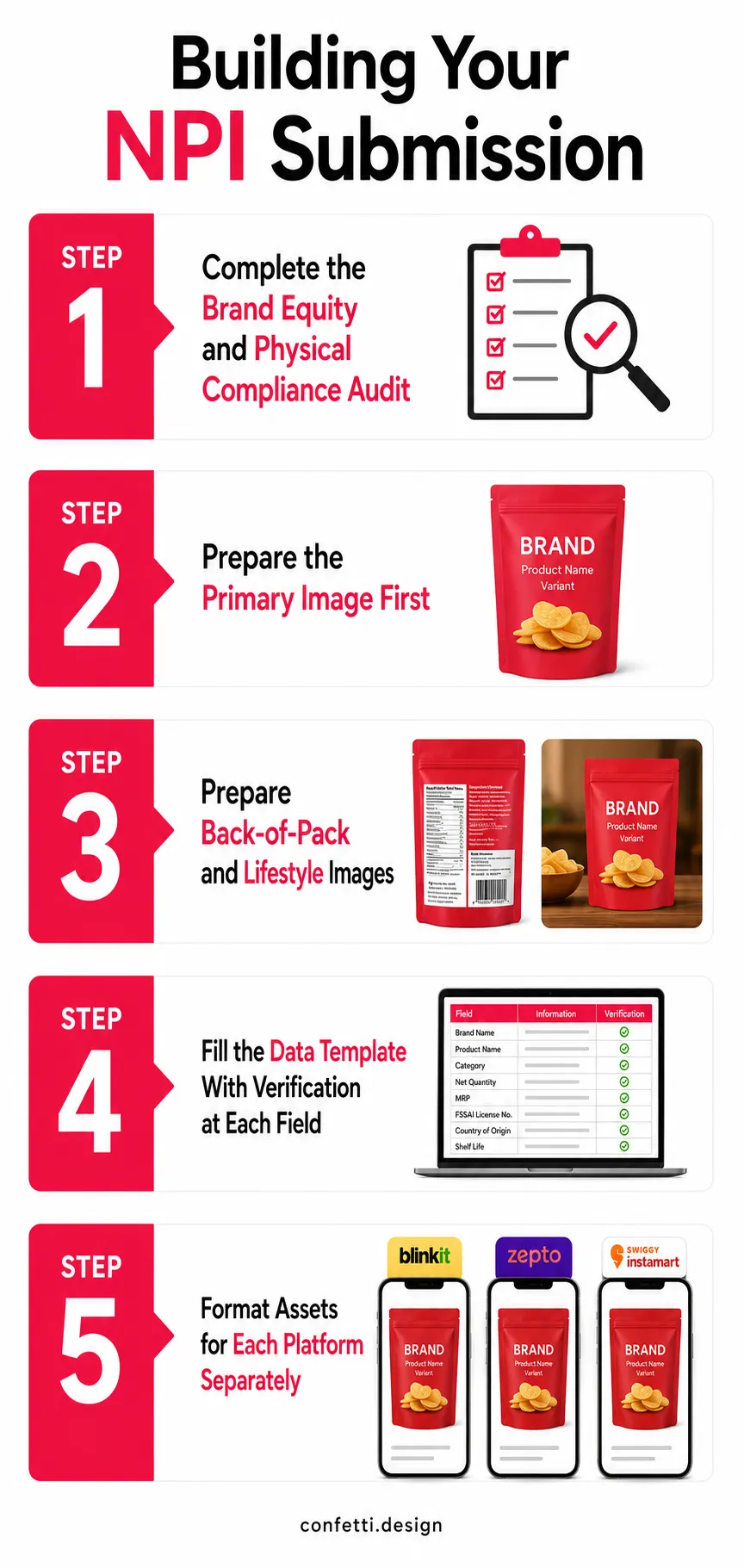
Follow these steps in order to avoid the two costliest NPI mistakes: designing before auditing and submitting before verifying:
Before you touch a design file, audit the physical product itself against NPI requirements. Run this checklist against the actual consumer unit:
Anything that fails here needs a physical fix before you submit it to NPI.
Your primary thumbnail is the highest-commercial-impact asset in the entire submission.
📸Brief the shoot to specify:
📌Run the 3-Second Scan Test before you go anywhere near submission.
📸Back-of-pack: photograph the full back panel under even, flat lighting. Check that the FSSAI number, MRP, and best-before format are all legible in the actual photograph.
📸Lifestyle/picker image: build this around your category and your target platform's audience. The same lifestyle image rarely works equally well across all 3 platforms. Treat this as a platform-specific brief.
Fill the NPI data template in this order, verifying each field as you go rather than batch-entering everything at the end:
Before you submit, do one final cross-check.
With the core asset set complete, adapt it per platform rather than submitting one identical bundle three times:
The NPI rejections we see most consistently fall into two buckets.
Physical Packaging Compliance:
⚠️an FSSAI number that isn't visible on the primary consumer unit
⚠️an MRP format that doesn't meet Legal Metrology spec
⚠️a barcode that's inaccessible once the product is stacked the way dark stores actually stack it
These are label decisions made before the brand ever thought about dark store operations, because at the time they were designed, dark store operations weren't part of the brief.
Image performance:
⚠️front-of-pack images that look genuinely excellent at print resolution and disappear at 200x200 pixels on a mobile screen
Both are fixable before submission.
When we at Confetti prepare NPI-ready catalogue assets for brands entering Blinkit, Zepto, or Instamart, the sequence is:
✅Physical Packaging Audit
Before a single photograph gets taken, we review the physical consumer unit against all platform NPI requirements at once: FSSAI placement, MRP format, barcode position, Legal Metrology completeness, shelf life compliance.
Anything that fails gets corrected at the label design or print specification level, before stock goes into production.
✅Packaging Design
Where the audit surfaces a structural gap, a label that doesn't accommodate mandatory compliance text, a pack format that won't perform in a Q-commerce impulse context, we address it at the design level.
Packaging gets designed by our experienced team and tested specifically for digital retail behaviour on platforms like Zepto, Blinkit, and Instamart.
✅Primary Image Production with the Thumbnail Test Built In
We design the front-face label, then test the primary product image at both 100px and 200px width against the leading competitor thumbnails in the target category on Blinkit and Zepto.
We don't sign off on a primary image for submission until it earns the click in that specific context.
✅All 3 Image Types, Formatted Per Platform
We format each set separately to Blinkit's, Zepto's, and Instamart's individual naming conventions, file formats, and resolution requirements.
One core asset set, adapted 3 ways, rather than three separate shoots.
✅Data Template Support
We cross-check every data field: HSN codes, MRP, shelf life, pack size, against the physical product and the brand's GST documentation before anything gets submitted.
This is the step that prevents the exact category of error that causes rejection at data validation, which is often the most avoidable and least visible failure point in the whole process.
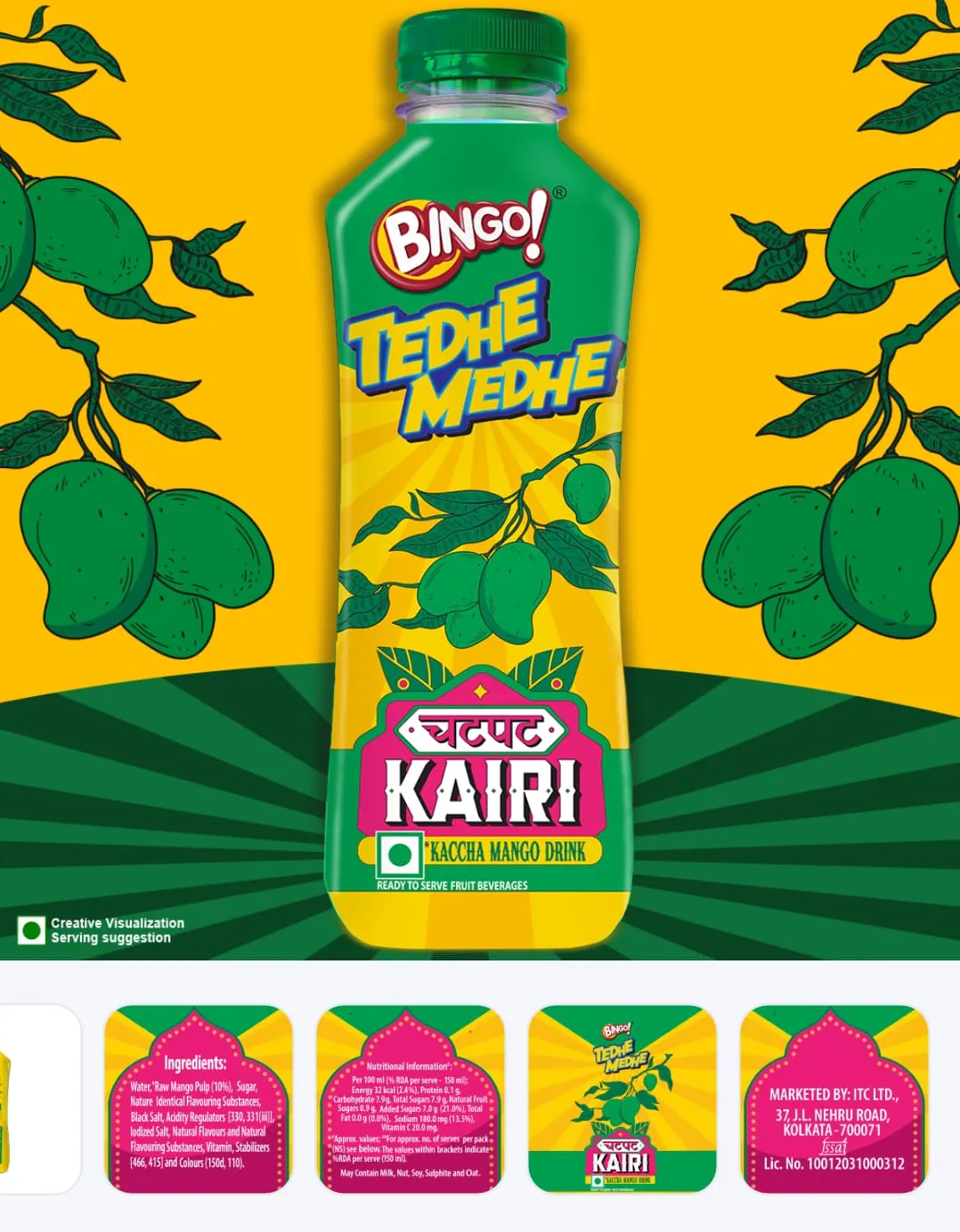
📌When ITC extended Bingo, into beverages with Aam Panna, this was a full NPI. Confetti built brand identity, color system, typography, and packaging, which is the work a true NPI demands for quick commerce.
This checklist covers every field, image spec, and compliance mark Blinkit, Zepto, and Instamart check before your product goes live, verify before submission.
📋Physical Packaging Compliance
📋Primary Image (front-of-pack)
📋Back-of-Pack Image
📋Lifestyle/Picker Image
📋Data Template Fields
What does NPI mean in quick commerce?
NPI or New Product Introduction is the approval process required before a product can be listed and sold on quick commerce platforms.
On Blinkit, Zepto, and Swiggy Instamart, brands submit product details and images to a Category Manager (CM) for review. Only products that pass NPI can be stocked in dark stores.
How many images are required for NPI on Blinkit, Zepto, and Instamart?
All three platforms require a minimum of 3 images per SKU: a front-of-pack primary image (minimum 1000x1000px, white background), a back-of-pack or nutritional/ingredient panel image, and a lifestyle or in-use contextual image.
What causes NPI rejection on quick commerce platforms?
The most common NPI rejection causes are low-resolution product images (below 1000×1000px), non-white/plain backgrounds (especially on Instamart), HSN code mismatches, MRP discrepancies between the catalogue and product, missing FSSAI numbers on food products, and insufficient shelf life. Each rejection typically delays go-live by 5–7 working days.
Does image quality in NPI affect sales performance after going live?
Yes, directly and measurably. The primary product image submitted at NPI is the image displayed to consumers on the platform's category pages. At the scale it's displayed, approximately 200x200 pixels on a mobile screen.
It is the primary determinant of click-through rate. CTR is an algorithmic ranking signal on both Blinkit and Zepto: products that earn more clicks in the same search position receive more organic impressions over time.
What is the correct product title format for quick commerce NPI?
The correct product title format across all three platforms is: Brand Name | Product Name | Key Variant or Claim | Pack Size. For example: "Yoga Bar | Protein Bar | Dark Chocolate Almond | 50g."
Marketing copy, descriptive language, and generic claims should not appear in the title field. The title must function as a search-parseable product identifier, not a marketing. This structure determines how the product appears in search results and which consumer queries it matches.
Can I submit the same NPI assets across Blinkit, Zepto, and Instamart?
You can use the same core asset set across Blinkit, Zepto, and Instamart if it meets the strictest requirements. The main difference is background compliance: Instamart requires a pure white background, while Zepto is slightly more flexible in some categories.
Image naming, upload formats, and NPI templates also vary, so each submission must be formatted for the specific platform.
How long does NPI take on Blinkit, Zepto, and Instamart?
For brands submitting complete, correctly formatted catalogue assets in a single round: NPI review usually takes 7–15 working days. Each correction round (caused by rejected images, data field errors, or compliance failures) adds 5–7 working days.
Brands that prepare assets correctly before first submission consistently move through NPI in the lower end of this range. Brands that go through multiple correction rounds can add 3–6 weeks to their total go-live timeline.
Want strategic branding and packaging like this for your business?





.webp)
.webp)

.webp)
.webp)
.webp)
.webp)
.webp)







.svg)
.webp)