%201.webp)
02
AI Snaps
.svg)
.svg)
01
Our Work
03
About Us
04
Brand Audit
05
Contact Us
06
Client Success
12
07
Blogs
08
Careers
Book A Call
.svg)



.svg)
Need Help In Building Your Brand?
Click the button below & book a call with our founder directly.

Rishabh Jain
Managing Director
You've submitted your application to the Blinkit seller program. Wondering what to do next?
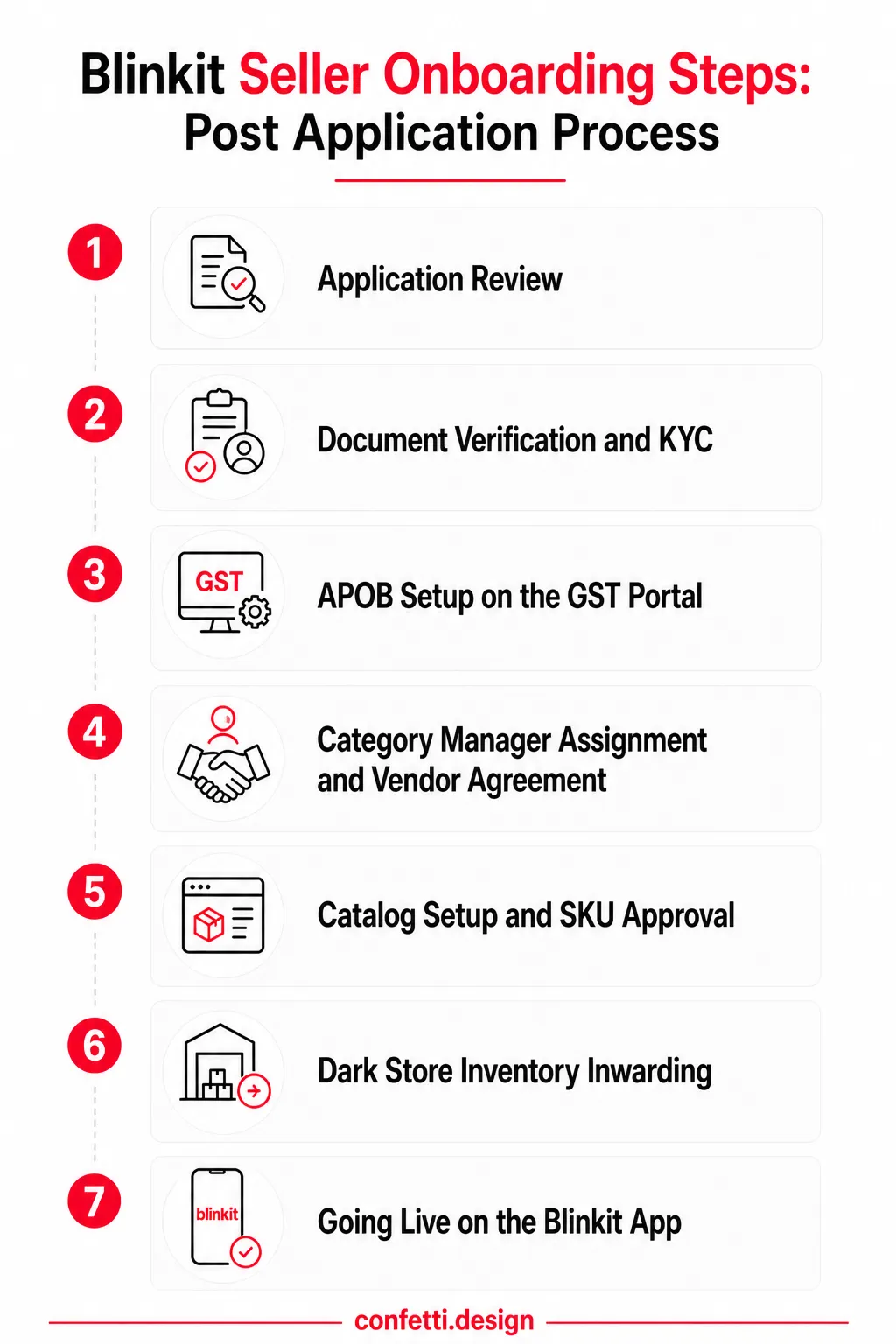
Blinkit's onboarding is a seven-stage process, each requiring active input from your side after submitting your seller application.
This guide walks you through every stage, what Blinkit checks at each step when you submit your application, and how to stay ahead of the delays that slow most brands down.
Most sellers assume Blinkit onboarding works like Amazon or Flipkart, fill a form, upload documents, go live. It doesn't.
Blinkit runs a curated, team-managed process. There's no self-serve portal where you complete steps at your own pace.
Every stage involves a Blinkit team member on the other end, which means delays are real, follow-ups are necessary, and preparation is super important.
From the moment you submit your application to the day your products appear on the app, there are seven distinct stages:
Each stage has its own timeline, its own requirements, and its own potential for things to stall if you're not ready.
The full process usually takes 6 to 12 weeks, sometimes longer for brands entering competitive or regulated categories.
Once you submit your application on the Blinkit seller portal, a Blinkit team member goes through each application manually, which is partly why timelines vary.
Officially, the review window can be anywhere from 20 to 45 days. But in reality, most brands with complete documentation and a clean application hear back in 7 to 15 business days.
The variance comes down to two things:
If your product category is already saturated in your target dark stores, or if your pricing leaves little room against established players, the review may take longer or result in a rejection.
The review is very thorough. Here's what Blinkit’s team is actually evaluates:
✅Document completeness
GSTIN, business registration, and bank account details must be submitted accurately and in the correct format. Missing or mismatched details stall the review immediately.
✅FSSAI compliance
This is mandatory for all food and FMCG products. Your FSSAI licence number must be current and match the product categories you're applying to sell. An expired or pending licence is an automatic hold.
✅Product category eligibility
Not all categories are open to new sellers at all times. Blinkit periodically restricts categories based on supply sufficiency in specific cities.
✅Barcode compliance
Every SKU needs a valid EAN or UPC barcode. Blinkit's system is barcode-driven; without it, your product can't be catalogued or tracked through their dark store infrastructure.
✅Brand authorisation
If you're not the brand owner, you need a letter of authorization from the brand. Resellers and distributors are held to a stricter documentation standard.
✅Pricing competitiveness
Blinkit compares your MRP and expected selling price against existing listings and competing platforms. If there's insufficient headroom usually after accounting for their commission, logistics, and any promotional discount obligations the application may not progress.
The 7–20 day review window is your most productive period.
Use the review period to get ahead:
✅Begin your APOB application on the GST portal.
Adding Blinkit's dark store addresses as Additional Places of Business under your GSTIN takes time often 5 to 14 days. Starting this before approval saves you weeks later.
✅Commission your product catalogue photography.
Blinkit has specific image requirements: white background, minimum resolution, no overlaid text on hero shots. If you're doing this after approval, you're adding at least a week to your timeline.
✅Audit your packaging and labels.
Check that FSSAI licence number, nutritional information, MRP, net weight, manufacturer details, and country of origin are all printed correctly and legibly. Errors here will resurface at Stage 5 and delay SKU approval.
✅Confirm barcode printing.
If your current packaging doesn't carry a scannable EAN barcode, sort this now. Reprinting or relabelling after the fact is avoidable.
✅Verify your FSSAI licence validity.
If it's due for renewal in the next three to six months, renew it now. Blinkit won't onboard a brand on a licence that's close to expiry.
✅Draft your product descriptions and spec sheets.
You'll need MRP, weight, dimensions, ingredients or key specifications, and HSN codes for every SKU. Having these in a clean spreadsheet cuts your catalogue setup time.
Brands that onboard the fastest use Stage 1 not as downtime, but as a window to prepare.
Once Blinkit approves your application, their vendor operations team initiates KYC which usually takes 2 to 7 days if your documents are in order.
A single blurry scan or a name mismatch between your GSTIN and your bank account can reset the entire clock.
KYC is the gateway to everything that follows. No verified KYC means no vendor agreement, no catalogue setup, no inwarding.
At this stage, Blinkit collects:
✅Name consistency is the most important
The business name on your GSTIN, PAN, and bank account must match exactly.
Even minor discrepancies a "Private Limited" vs "Pvt. Ltd." variation, or a trading name vs. registered name issue trigger a resubmission request.
✅Document quality is non-negotiable
Blinkit's verification team rejects scans that are blurry, cropped, or low-resolution.
Submit clear, full-page scans of original documents. PDF format is preferred over JPG wherever possible.
✅FSSAI is a must for FMCG.
If your licence is under renewal or has lapsed, your KYC will not clear. There is no workaround.
A provisional FSSAI acknowledgement is sometimes accepted during the gap period, but make sure to check this directly with your category manager before assuming it applies to you.
✅The Brand Authorisation Letter needs to be on letterhead
If you're a distributor or a contract manufacturer selling under a third-party brand, the authorisation letter must come from the brand owner.
It must be dated, specify the product categories covered, and carry a signature and company seal. A generic email confirmation won’t pass verification.
APOB (Additional Place of Business) is a GST registration requirement that applies any time your inventory is physically stored at a location that isn't your registered principal place of business.
So, when you send stock to a Blinkit dark store, that warehouse legally becomes a place of business under the GST Act.
This means it needs to be registered as an APOB under your GSTIN before a single unit can be dispatched.
Sellers unaware of this often lose 7–10 days or more waiting for GST portal approvals, which delays onboarding.
Without a valid APOB registration covering the relevant dark store address, Blinkit cannot legally accept your inventory for inwarding. Their warehouse team will not process your stock.
No APOB, no dispatching, no going live.
For example, if you are starting in Bengaluru and adding Delhi or Mumbai, each new dark store geography requires its own APOB registration.
Although the registration isn't complicated, the GST portal's processing times can vary. ARN (Application Reference Number) approval usually takes 5 to 7 working days, and in some cases longer if the jurisdictional officer raises a query.
You'll need the exact warehouse address from Blinkit before you begin. Request this from your Blinkit point of contact as soon as your application is approved.
Step-by-step process:
Upload supporting documentation for the address. Blinkit usually provides a No Objection Certificate (NOC) or a consent letter for this purpose.
Submit and the portal will generate an ARN immediately upon submission. Share the ARN with your Blinkit vendor manager or category contact.
Once your KYC clears, Blinkit assigns you a Category Manager. On Blinkit, you cannot bypass the CM to add or modify a SKU. Every listing action goes through them.
Be responsive, come prepared to meetings with clean data, and don't waste your CM’s time with SKUs that clearly don't fit the category brief.
Your Category Manager’s decisions directly determine:
✅SKU eligibility
Which of your products get listed, and which don't make the cut. Blinkit is selective about range; CMs regularly reject SKUs that overlap too closely with existing listings or don't meet minimum demand thresholds for their dark stores.
✅Pricing parameters
Your CM sets the floor and ceiling within which your selling price must sit. This is category-specific and non-negotiable. If your cost structure doesn't work within their pricing band, you won't get the SKU listed.
✅Promotional campaign access
Visibility on Blinkit's app, homepage banners, category page placements, discount campaigns is allocated by the CM. Brands that build a working relationship with their manager get earlier access to these slots.
✅Listing priority
Within a category, the CM influences where your product appears relative to competitors. This isn't purely algorithmic in the early stages; CM recommendation carries weight.
After a CM assignment, Blinkit issues a Vendor Master Agreement (VMA) , the legal document that defines your commercial relationship with the platform. Read it carefully before signing.
Key terms you need to know:
✅Commission structure
Blinkit's take rate varies by category. Food and grocery usually runs between 10% and 18%; personal care and general merchandise can go higher.
✅Payment cycle
Blinkit usually settles payments on a 7 to 30-day cycle post-sale, depending on category and vendor tier.
✅Return and damage policy
The agreement specifies how unsold, expired, or damaged inventory is handled at the dark store level.
✅Exclusivity clauses
Not universal, but present in some category agreements. Check whether anything restricts you from simultaneously listing on other quick commerce platforms.
✅Compliance obligations
Labelling standards, packaging requirements, and quality checks are often referenced here. Non-compliance can result in delistings or returns at your cost.
Once the agreement is signed, Blinkit generates a unique Vendor Code for your account. This code is your identifier across their systems. Keep it accessible; you'll need it repeatedly.
Every SKU you submit goes through a structured review.
Blinkit's catalogue team checks each listing against a defined set of criteria before it can be approved for live listing.
For each SKU, catalogue team reviews:
✅Product imagery
Must be shot on a clean white or light background, front-facing, with the product filling at least 85% of the frame. No lifestyle shots, no overlaid text, no watermarks on the hero image.
✅MRP on physical packaging
The MRP printed on your actual packaging must match what's declared in the catalogue exactly. Discrepancies between the two, even a ₹1 difference will trigger a rejection.
✅Barcode compliance
Blinkit requires a valid EAN-13 or GTIN-compliant barcode on every SKU. The barcode on the physical product must scan cleanly and match the code registered in your catalogue entry.
✅Pack size and weight accuracy
Net weight, volume, or unit count must be declared precisely and match what's on the label. "Approximately 500g" will not pass. The declared value must be exact.
✅Category mapping
Your product must be mapped to the correct Blinkit category and subcategory. Incorrect mapping doesn't just cause a rejection, it can affect discoverability even if the SKU eventually goes live.
⛔Barcode mismatch
The EAN on the product packaging doesn't match the barcode submitted in the catalogue, or the barcode hasn't been registered with GS1 India. Blinkit's system cross-references both.
⛔Image quality issues
Shadows, grey backgrounds, angled shots, or images pulled from a brand website rather than shot specifically for marketplace listing.
Quick commerce platforms display products in small tiles; poor images kill conversion before the SKU even goes live.
⛔Declaring incorrect pack size
A common error with multipacks or combo SKUs. Submitting a "Pack of 6" SKU with the single-unit MRP, or incorrect net weight for a bundle, will be caught and rejected.
⛔Missing MRP on physical label
If your packaging doesn't carry a clearly printed MRP or if it carries a sticker MRP over the original, it won't pass.
⛔Price point outside category norms
If your MRP is significantly out of range with existing listings in the category, the CM may flag it before or during catalogue review.
Each rejected SKU must be corrected and resubmitted as a new batch. That means another 3 to 7 day review cycle, from scratch.
The single most effective thing you can do is submit in small, clean batches of 5 to 10 SKUs rather than uploading your entire range at once.
When a large batch, say, 40 or 50 SKUs is submitted together and 15 of them have issues, Blinkit's catalogue team often holds the entire batch pending correction.
Beyond batch sizing:
✅Shoot images specifically for marketplace listing.
Don't repurpose websites or social media photography. A clean, purpose-shot white background image at 1500 x 1500px clears review faster and performs better once live.
✅Verify every barcode against the GS1 India database before submission.
GS1 India's barcode verification tool is free to use. If your barcode isn't registered or returns a mismatch, fix it before the catalogue team finds it.
✅Build a master SKU data sheet before you open the Seller Hub.
Include EAN, MRP, net weight, dimensions, HSN code, and category mapping for every product. Filling catalogue fields from a prepared reference document is faster and less error-prone than working from memory or individual product labels.
✅Align your MRP to market before submitting.
If your price sits outside the band your CM has already indicated, raise it with them before catalogue submission.
✅Check physical packaging against catalogue data one final time.
Run a side-by-side check: packaging label vs. catalogue entry, for every field. It takes 20 minutes and routinely catches the errors that cost brands a week.
SKU approval means you're cleared to send stock.
The next step is physically dispatching inventory to Blinkit's designated dark store or stores for your city, and getting it accepted and inward-processed by their warehouse team.
You don't choose which dark store receives your inventory.Blinkit's supply planning team assigns specific dark stores based:
For most cities, a single dark store handles a defined delivery radius.
In high-density metros like Bengaluru, Delhi, or Mumbai, you may be assigned multiple dark stores within the same city to ensure coverage across delivery zones.
Each assignment is handled separately, which means separate dispatches, separate inwarding timelines, and separate stock norms per location.
Once assigned, you'll receive the dark store address, contact details for the inward team, and a dispatch schedule.
Do not send inventory without this confirmation. Unscheduled or unannounced deliveries are turned away.
Blinkit applies minimum inventory norms per SKU at the dark store level.
The exact quantity varies by category; FMCG products like packaged snacks or beverages have higher minimum thresholds than slower-moving personal care SKUs.
Your category manager will communicate the specific norms for your product range.
For perishable or short shelf-life products, Blinkit applies additional norms around remaining shelf life at the point of inwarding. Products that arrive with less than a specified percentage of their total shelf life remaining are rejected at inward.
📌For most food SKUs, the expectation is 60 to 70% remaining shelf life at the time of dispatch.
The dark store inward team physically inspects every shipment. This is where catalogue-to-physical discrepancies get caught and they do get caught.
It doesn't matter that your SKUs passed catalogue review; the physical product is verified independently.
Each carton or shipping unit must carry:
Damaged packaging dented cans, torn labels, crushed boxes is rejected at inwarding regardless of product condition.
Blinkit's dark stores are high-throughput, and their inward teams work to strict acceptance criteria. There is no "we'll sort it out later" provision.
Once your shipment arrives at the dark store, inwarding takes 2 to 5 working days depending on the volume the dark store is processing at that time.
High-demand periods ahead of festive campaigns or major platform sale events can stretch this to 7 days or more.
Build that buffer into your launch planning. For brands going live across multiple cities simultaneously, each city's inwarding is handled independently.
For example, Delhi's dark store has no visibility into what Bengaluru has accepted, and inventory norms, dispatch schedules, and inward contacts differ by location. Coordinate each city as a separate operational task, not a single unified dispatch.
When the dark store confirms your inventory is inward-processed, Blinkit activates your SKUs. Your products become visible and purchasable on the app.
Visibility on Blinkit is hyperlocal. Only customers within the delivery radius of your stocking dark store can see your products.
If you're live in one Bengaluru dark store, a customer in a neighbourhood that falls under a different dark store won't see your listing at all. This is how quick commerce works.
Going live is not the finish line. What happens in the first 4-6 weeks on the platform materially affects your long-term ranking.
✅Track sell-through rates from day one.
Your Seller Hub dashboard gives you visibility into units sold, current inventory levels, and order data by SKU. Check it daily in the first two weeks.
You need to understand which SKUs are moving and which aren't before you make any inventory replenishment decisions.
✅Protect your in-stock position.
Out-of-stock events on Blinkit carry a ranking penalty that takes time to recover from.
The platform's algorithm deprioritises SKUs with inconsistent availability because stockouts directly damage the customer experience.
✅Respond quickly to your CM's inputs.
In the early weeks post-launch, your category manager may flag pricing adjustments, packaging observations, or promotional opportunities.
Brands that respond within 24 to 48 hours get faster resolution and stay visible on the CM's radar in a way that matters.
✅Participate in Blinkit's promotional calendar if your CM offers access.
Promotional slots, discount campaigns, category-level deals, homepage features are allocated by the CM and not available on demand.
If offered, evaluate the margin impact carefully, but don't reflexively decline.
If your application doesn't clear their threshold on category fit, pricing viability, or documentation, it gets rejected.
A founder shared how the onboarding process for brands is slow, opaque, and frustrating.
The five most common rejection reasons:
⛔Incomplete or incorrect documentation
Missing FSSAI, blurry scans, name mismatches across GSTIN and bank details, or an absent brand authorisation letter
⛔Category not open for new sellers
Blinkit periodically closes categories in specific cities when supply is sufficient. Your brand may be entirely eligible, but the timing is wrong
⛔Pricing non-viability
Your MRP doesn't leave enough margin headroom after Blinkit's commission (usually 8 to 15% depending on category), operational costs, and any mandatory promotional discounting
⛔Packaging non-compliance
Missing or unscannable barcode, absent MRP, non-compliant labelling under FSSAI or Legal Metrology rules, or inadequate shelf-life for quick commerce throughput
⛔Unregistered brand or unfiled trademark
Blinkit has tightened brand verification requirements over time. An unregistered brand or a pending trademark application without supporting documentation is a common rejection point for early-stage brands
⛔APOB not registered or incomplete
If your GST registration doesn't reflect the dark store address as an APOB, Blinkit cannot legally accept your inventory.
Blinkit usually communicates the rejection reason via email or through your application status on the seller portal. In some cases, if you've already been in contact with a category manager during the review process, feedback comes directly from them.
Either way, your first step is to get the specific reason in writing not a general "application unsuccessful" notification, but the actual flagged issue. If the communication is vague, follow up and ask directly.
Once you have the reason, the recovery depends on the cause of rejection. For example, if your application got rejected due to a mismatch of documents then re-submit the proper documents.
Resubmissions are not penalised by default, but repeated rejections on the same account do affect how your application is treated.
Fix the issue completely before reapplying, don't submit a partial fix and hope the reviewer doesn't check the remaining details.
Your packaging faces two judges on Blinkit. The first is the Category Manager reviewing your application. The second is the dark store inward team scanning every barcode.
Here is exactly what both look for.
Here is the complete compliance checklist for every product you send to Blinkit.
Compliance gets you listed. Design determines whether you sell.
On the Blinkit app, your product appears as a thumbnail roughly 200 x 200 pixels on a mobile screen.
At that size, cluttered layouts, low-contrast colours, and illegible brand names lose to cleaner competition before a customer has made any conscious decision.
Dark store performance adds another layer. Pickers move fast.
Packaging with the product name and variant clearly legible on multiple faces reduces pick errors, which feeds directly into your seller rating and ranking.
This is where getting packaging right before you apply, not after rejection.
At Confetti, we work with FMCG brands on exactly this problem: packaging that meets every mandatory labelling requirement and holds up commercially at thumbnail scale.
Our packaging work for ITC Bingo Chatpat Kairi, which is listed on Blinkit is a project that won the World Brand Design Society Award 2025 is a good example of how bold, category-specific design and compliance clarity can coexist without compromise.
Getting listed on Blinkit is one problem. Getting your packaging approved on the first submission, your brand legible in a 200px thumbnail, and your products moving off dark store shelves consistently, that's a different challenge entirely.
At Confetti, we work with FMCG and D2C brands. While designing, we map every mandatory element such as:
Nothing gets hidden. Nothing gets forgotten.
Our work isn't packaging design in isolation, it's packaging designed specifically for where your product needs to perform: quick commerce listings, dark store shelves, and the compliance requirements.
We make your product "Digital-Ready" for Blinkit. That means, packaging optimized for quick commerce speed.
Easy to photograph, instantly recognizable on a small phone screen, and durable enough to survive quick bike delivery.
How long does Blinkit take to approve a seller application?
Blinkit's approval timeline ranges from 7 to 45 business days. Applications with missing documents, APOB issues, or pricing misalignment can stretch to 45+ days. Submitting everything correctly the first time is the single biggest time-saver.
Can I track my Blinkit seller application status?
Blinkit does not offer a real-time application tracker. Most sellers receive updates via email from the vendor onboarding team or directly from their assigned Category Manager.
If you haven't heard back in 20+ business days, reach out via the Seller Hub or your registered email. Following up once a week is acceptable and it signals seriousness.
What is APOB and why does it matter for Blinkit sellers?
APOB is Additional Place of Business. When you store inventory at a Blinkit dark store, that warehouse legally becomes a place of business under GST law.
You must register it as an APOB on the GST portal and share the ARN with Blinkit before they can accept stock. Skipping this step blocks all inventory movement.
What commission does Blinkit charge sellers?
Blinkit charges a commission of 8% to 15% per order, depending on the product category. FMCG staples tend to sit at the lower end; personal care and specialty items can be higher.
Exact rates are confirmed during the Vendor Agreement signing with your assigned Category Manager. Additional charges include fulfilment fees and return handling factor these into your MRP before listing.
What happens if Blinkit rejects my seller application?
Blinkit usually notifies rejected applicants via email, citing a reason. Common causes include incomplete documents, packaging non-compliance, pricing issues, or a closed category.
Most rejections are fixable. Identify the specific issue, correct it, and reapply. If the category is closed, ask your Category Manager (if already assigned) for a reopening timeline.
Does my packaging need to change before listing on Blinkit?
Yes, if it wasn't designed for quick commerce. Blinkit requires clear MRP printing, a scannable EAN-13 barcode, net weight declaration, and FSSAI number (for food). Beyond compliance, app-optimised packaging performs better on Blinkit's thumbnail-driven UI.
Brands that invest in packaging before submission face fewer catalog rejections and see faster sell-through.
Can first-time brands with no e-commerce history sell on Blinkit?
Yes. You'll need a valid GST, trademark registration (or pending application), FSSAI (for food), and packaging that meets compliance standards. Strong product-market fit in high-demand categories (FMCG, personal care, daily essentials) improves your chances.
Working with an onboarding partner who knows Blinkit's requirements also reduces rejection risk.
Want strategic branding and packaging like this for your business?





.webp)
.webp)

.webp)
.webp)
.webp)
.webp)
.webp)







.svg)
.webp)